Saturday, August 29, 2009

p55 Asus Maximus III Gene

The Taiwan-based motherboard manufacturer Asus is said to be working on a new P55 motherboard, Maximus III Gene, according to Lab501.

The board is shipping with 10-phase PWM design, four DDR3 dual-channel memory slots, two PCIe x16 slots, one PCIe x4 & PCI slot, and comes bundled with X-Fi SupremeFX sound card.

Asus Maximus III Gene motherboard is expected to start selling at the end of this month, but the pricing has yet to be confirmed.


source: expreview.com

DFI LANParty DK P55-T3eH9

DFI's retail-grade pack of motherboards for socket LGA-1156 platform will be lead by the LANParty Dark P55-T3eH9. Dressed in black and orange, the P55-T3eH9 sports a fairly standard feature-set for the Intel P55 chipset. The CPU socket is powered by a 6+2 phase VRM, and is wired to four DDR3 DIMM slots for dual-channel memory. Expansion slots include three PCI-Express x16, depending on what's under the heatsink south of the CPU socket, the orange slots could be (dual x16 or x8). The black slot looks like PCI-E x4, wired to the PCH. Two PCI-E x1 and PCI slots make for the rest of the expansion. Apart from all the features the P55 PCH provides, including six SATA II ports, an additional controllers add two SATA II, an eSATA and one IDE connector for two devices. Connectivity is care of one gigabit Ethernet controller, and a number of USB ports, including one mini-USB. A high-grade HD audio codec also provides digital audio connectivity through optical and coaxial SPDIF connectors. The LANParty Dark P55-T3eH9 is expected to be priced at 175€.

Source http://www.techpowerup.com/102308/DFI_LANParty_DK_P55-T3eH9_Detailed.html

RAM VGA 256MB VS. 512MB VS 1024MB

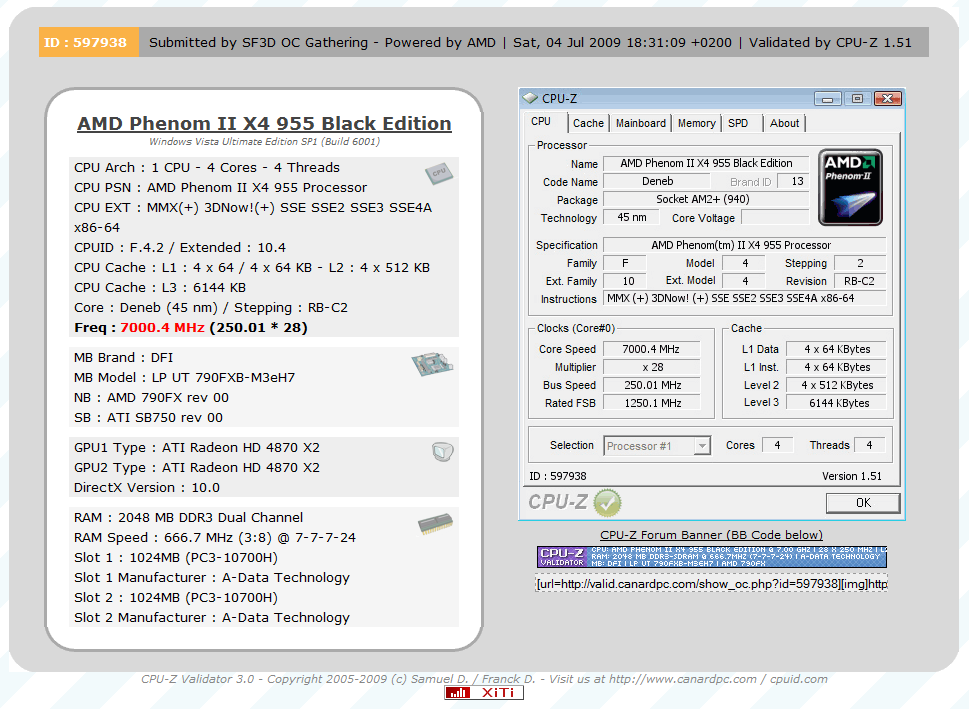
New Record 7.00GHz By Phenom II TKWR 42 (955BE)

Pic link http://www.techpowerup.com/img/09-07-07/23a.png

New Record 7.00GHz By Phenom II TKWR 42 (955BE)

Pic link http://www.techpowerup.com/img/09-07-07/23a.png

AMD Multi-Thread

AMD's next generation CPU features multi-threading


AMD's next generation architecture, codenamed Bulldozer, will feature a multi-threading system, Xbitlabs reports.

However, AMD claims that Bulldozer's multi-threading is different from the simultaneous multi-threading (SMT) available with Intel's HyperThreading.

The first Bulldozer desktop CPU, Orochi, is expected to be a 6/8 core CPU with >8MB cache, supporting DDR3 RAM, manufactured on 32nm. It is due to hit stores in 2011. The Fusion CPUs or APUs (Accelerated Processing Units), as AMD calls them, are also part of the Bulldozer architecture. Bulldozer is expected to support up to 16 cores. It is expected to be the most significant change in AMD's CPU architecture since K8, back in 2003.

The next CPU on AMD's roadmap is the 12-core server CPU "Magny Cours" based on a Multi-Chip Module, which packages two 6-core "Istanbul" dies in one package. The Magny Cours CPU is designed for the elongated Socket G34, and will launch in Q1 2010. It is also expected to be the last AMD CPU till Bulldozer, according to AMD's current roadmap. In the desktop arena, the Phenom II/Athlon II products may have to fight all the way through 2010, according to AMD's current roadmaps.

Credit : http://vr-zone.com/articles/amd-s-ne....html?doc=7501
http://www.xbitlabs.com/news/cpu/dis...echnology.html

เค้ากะจะเอา6-8คอร์เลยหละ

DEMO 48-Core Codename ''Magny-Cours''


http://www.techpowerup.com/102445/AM...hitecture.html

How to Convert Video to AVI/MP4//MP3/WMV/3GP for Mac Users

I believe you all have at least one of these Sansa, iPod, iPhone, Walkman, Creative Zen, Apple TV, Nokia, Zune, PSP. Actually these portable devices cannot accept all formats of video, so lots of wonderful video can only be enjoyed on computer and it is so inconvenient.
Here I’d like to introduce a powerful converter to you so that you can enjoy your video better.
Tipard Video Converter for Mac is dedicated to converting AVI, MP4, MPG, MOD, TOD, MOV, MKV, WMV, DivX, XviD, MPEG-1/2, 3GP, 3G2, VOB, MOV, MPV, FLV, and HD videos(HD TS, HD MTS, HD M2TS, HD WMV, etc to what you want one of above on Mac. It is a great program for you to enjoy video on the portable devices.

The step-by-step guide is shown below.

Step 0: Download and install the video converter for Mac (Intel Version) or (Power PC Version). After the action, you will see the following screenshot:


Step 1: Click the "Add Files" button and add the video files you want to convert.

Step 2: Select the video or audio format you want to convert it to. At the same time, you can set the output parameters of the conversion by clicking “Setting” button to open the Setting window as follows:


Step 3: Click “Browse” button to specify a location to save the converted video or audio. If you want to open the output folder, click “Open” button.
Step 4: Click “Start” button.

Now you can have a cup of coffee to wait for the conversion.

This converter also has powerful editing functions besides conversion. Take some examples below:

1: Snapshot
If you like the current image of the video you can use the “Snapshot” option, just click the “Snapshot” button and the image will be saved and then click the “Open” button next to “Snapshot” button to open your picture.
2: Merge
If you want to merge several videos into one file you can choose them at one time and click the “Merge into one file” to do it.
3:Effect
Click “Effect” button you can do these actions: adjusting brightness, contrast and saturation of the video. You can easily adjust the video through two windows in the same interface.


4:Trim
If you just want convert a clip of your video, then you can use the "Trim" icon to set the Start time and End time of the clip or you can directly drag the slide bar to the accurate position.


5:Crop
By using the “Crop” function you can crop the black edge of your video and you can also drag the line around the video image to adjust your video to your Google Phone.


If you completely read this guide, now you could make full use of it and enjoy your video or audio on your portable devices to your content.

Source ipod video converter.